GeoIP Databases Legacy DDL
GeoIP Databases Legacy version Updates 1.6.2025 Direct Download PCSNET

If you have for your server regular PC Macintosh or Windows on XAMPP free app https://www.apachefriends.org/ or you have your UNIX server any (Ubunti/Fedora/Centos…) you can use legacy databases I converted from MaxMindDB to Legacy mode for your Apache/Ngnix WEB Server.
All databases are converted in dat legacy version and you can use those databases GeoIP for your analytics programs or Webalizer/Awstats ecc… free analytics softwares.
Source for DDL or Direct Download: https://perc.ddns.net/ddl/#search=geo
GEOIPLEGACY.ZIP contains:
GeoDB.dat = for Webalizer.org Microsoft free software (for XAMPP) or any UNIX BASE SERVER - Linux Server
GeoIP.dat = Main databases for your WEB-Server
GeoIPASNum.dat
GeoIPASNnumv6.dat
GeoIPCity.dat
GeoIPCityv6.dat
GeoIPISP.dat
GeoIPISPv6.dat
GeoIP-legacy.cvs
GeoIPOrg.dat
GeoIPOrgv6.dat
GeoIPv6.dat
Maxmind_GeoIP.zip CONTAINS:
GeoLite2-ASN.mmdb
GeoLite2-City.mmdb
GeoLite2-Country.mmdb
and all CVS ipv4 & ipv6 (useful for your php apps or python apps)
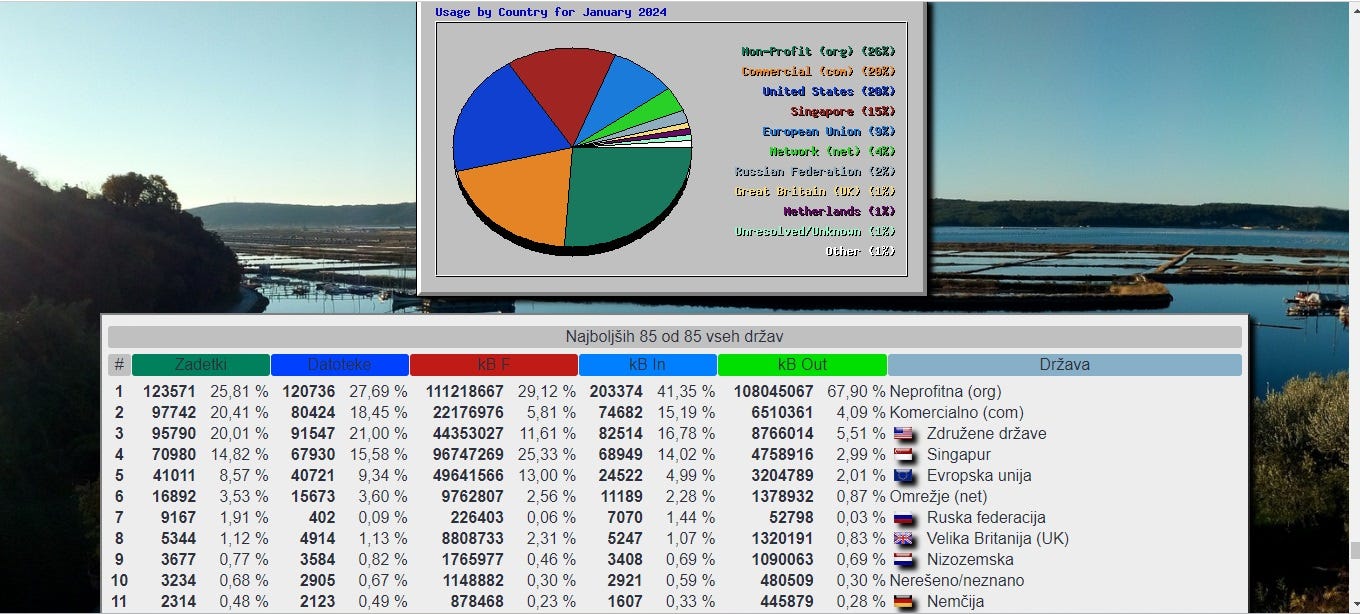
PS YOU CAN DOWNLOAD EVEN FLAGS USEFULL FOR WEBALIZER.ORG: https://perc.ddns.net/ddl/#search=flag
FOR EXAMPLE HOW TO USE THIS DATABASES ON WINDOWS OR MACINTOCH PC ON XAMPP:

https://pcsnet.dyn.ts.si/analytics/ DEMO FROM MY HOME NETWORK USING GEOIP.DAT AND GEODB.DAT ACCESIBLE ON ALL FREE DOMAINS ON MY NETWORK UNDER ALLIAS /STATISTIKA/ OR ANALYTICS:

INSTALL XAMPP SOFTWARE ON YOUR WINDOWS OR MACINTOSH PC, OPEN DIRECTORY WHERE YOU INSTALL SOFTWARE AND FOUND MAP: \apache\bin\GeoIP OR YOU CAN UPLOAD ON YOUR CUSTOM MAP FOR EXAMPLE /apache/GeoIP or can be even in source map XAMPP
Now open config file of Apache \apache\conf\ and edit httpd.conf copy source directory where you uploaded databases for example copy this for geoip but only if you use XAMPP version php7.4 if you installed php8+ version you need to download maxmind databases format mmdb but for this version php7.4 geoip mod apache works ddl from https://sourceforge.net/projects/xampp/files/XAMPP%20Windows/7.4.4/ for Macintosh is this link https://sourceforge.net/projects/xampp/files/XAMPP%20Mac%20OS%20X/7.4.4/:
For example I always use for Windows or Mac root dir of XAMPP map GeoIP
COPY THIS DIRECTIVE IN THE END OF FILE httpd.conf for Windows/Mac PC XAMPP php7.4 (Macintosh have different root is not C:!!!!)
<IfModule mod_geoip.c>
GeoIPEnable On
GeoIPDBFile C:\xampp\GeoIP\GeoIP.dat
GeoIPDBFile C:\xampp\GeoIP\GeoDB.dat
</IfModule>
COPY THIS DIRECTIVE IN THE END OF FILE httpd.conf for Windows/Mac PC XAMPP php8+ (Macintosh have different root is not C:!!!!)
<IfModule mod_maxminddb.c>
MaxMindDBEnable On
MaxMindDBFile CITY_DB C:\xampp\GeoIP\GeoLite2-City.mmdb
MaxMindDBFile CITY_DB C:\xampp\GeoIP\GeoLite2-Country.mmdb
MaxMindDBEnv MM_COUNTRY_CODE DB/country/iso_code
MaxMindDBEnv MM_COUNTRY_CODE CITY_DB/country/iso_code
MaxMindDBEnv MM_COUNTRY_NAME CITY_DB/country/names/en
MaxMindDBEnv MM_CITY_NAME CITY_DB/city/names/en
MaxMindDBEnv MM_LONGITUDE CITY_DB/location/longitude
MaxMindDBEnv MM_LATITUDE CITY_DB/location/latitude
</IfModule>
AFTER THIS SAVE FILE AND GO ON APACHE CONFIG TO ALLOW MODULES FOR PHP7.4 mod_geoip.so IF YOU DO NOT HAVE IT DOWNLOAD IT FORM NET SO DIRECTORY http://windows.php.net/downloads/pecl/releases/geoip/1.0.8/ AND UPLOAD THIS mod_geoip.so to directory apache/modules and go in map /apache/conf/httpd.conf and uncoment or add this line:
For GeoIP.DAT is add this where are modules
LoadModule geoip_module modules/mod_geoip.so
For MaxMind better option for new servers version add this or uncomment line:
LoadModule maxminddb_module modules/mod_maxminddb.so
NOW TEST IF ALL OK WITHOUT ERRORS, IN MAP \xampp\webalizer\webalizer.bat IS FILE TO EXECUTE LOOK FOR WEBALIZER.BAT OR FOR MAC /opt/lampp/bin/webalizer IF IS NOT WORKING CHANGE webalizer.php root to /Applications/xampp/xamppfiles/bin/webalizer DEPEND ON YOUR INSTALLATION. TEST IF ALL WORK AS IT SHOULD.
I suggest if you use new versions of XAMPP install MaxMind GeoIP databases on
https://dev.maxmind.com/ OR https://www.maxmind.com/
or you can download it from https://perc.ddns.net/ddl/#search=geo
My maxmindDB are old better to download the last version from maxmind.com because are regular updated!!!!
BETTER OPTION FOR VPS:

VirtualBox (Windows and Macintosh PC) best practice to convert your home pc in virtual server this method is more secure VPS on VBox for Windows or MAC PC. You can use your old Macintosh or Windows laptop or stationary PC and convert it in Server!!! Or if you have old Windows stationery PC delete all OS and install direct Ubuntu Server or any other UNIX base server that you know better and you use it for business purpose or private. Example my home pc is procesor i9 25 cores 32GB RAM DDR6 high end GPU because of AI for smart home apps and firewall and security cams and SCADA ecc… VPS is the best method to install on your main PC any UNIX base Server, VirtualBox is free Oracle program for Macintosh or Windows!

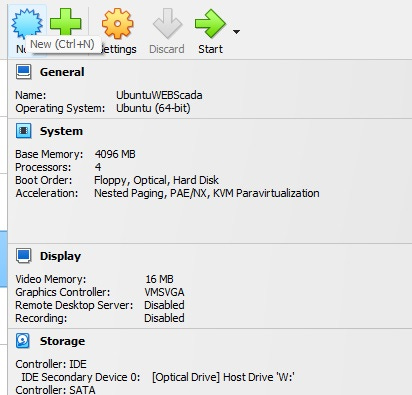
EXAMPLE HOW TO SETUP GEOIP.DAT…. ON LINUX SERVER UBUNTU/DEBIAN…. or using Virtual Computer sorry Server installed on VirtualBox best practice and secure if you want to convert your regular old pc to server!
Example Apache server UNIX/LINUX ANY
sudo apt update
sudo apt install automake autoconf libtool
sudo apt-get install build-essential libcurl4-openssl-dev zlib1g-dev -y
sudo apt-get install apache2 apache2-utils apache2-dev -y
sudo apt-get install libapache2-mod-geoip -y
sudo apt install libmaxminddb0 libmaxminddb-dev mmdb-bin -y
Then we open /etc/apache2/mods-available/geoip.conf and uncomment the GeoIPDBFile line so that the file looks as follows:
sudo nano /etc/apache2/mods-available/geoip.conf
<IfModule mod_geoip.c>
GeoIPEnable On
GeoIPDBFile /usr/share/GeoIP/GeoIP.dat
</IfModule>
sudo apt install geoipupdate
edit file in /etc/GeoIP.conf put your MaxMind credentials for your account.
Download my legacy databases if you have paid account for maxmind you can convert ich time to legacy dat mode all maxminddb or .mmdb in dat, depend how many php versions you use on your sever specially for php5+ to 7.4 version legacy mode will be ok/best for you and many other programs you use (OwnCloud php7.2 last released version php or many others, you can download them from my PC or GitHub/souceforge/….).
Installing GeoIP LEGACY on your Linux server any:
Now we install all modules and dependence for example Ubuntu Server or Debian minimal install no desktop and look for Centor or Fedora ecc… directives for terminal to install same depending modules and databases:
sudo apt-get install geoip-bin geoip-database
and for updating as mentioned before: sudo apt install geoipupdate
or for full databases/modules I use this terminal command Apache WEB Server:
sudo apt-get install libapache2-mod-geoip -y && sudo apt-get install geoip-bin -y && sudo apt-get install geoip-database -y && sudo apt install libmaxminddb0 libmaxminddb-dev mmdb-bin -y
or if you use Awstats too perl is needed too and for php use module too:
sudo apt-get install libgeoip-dev -y && sudo apt-get install geoip-bin -y && sudo apt-get install libgeoip1 -y && sudo apt-get install libgeoip2-perl -y && sudo apt-get install libpam-geoip -y && sudo apt-get install php-geoip -y
Upload all databases in map: /usr/share/GeoIP
overwrite old ones GeoIP.dat and GeoIPv6.dat or remane them in example 1GeoIP.dat and 1GeoIPv6.dat and upload all legacy databases to GeoIP directory.
FOR SOME SERVERS AND WINDOWSNT THE MAP IS IN /usr/local/bin/GeoIP but you can point database in any map you want do not forget to setup path where are your databases!!! https://pecl.php.net/package/geoip/1.1.1/windows
You have alternatives too: https://github.com/SV-Foster/GeoIP-Service
GeoIP for AwStats you can use same legacy databases I converted from MaxMind and setup databases in main file /etc/awstats/awstats.conf for windows server check this article https://www.damirscorner.com/blog/posts/20150105-HowToConfigureAwstatsForWindowsAndIis.html

You can easy integrate your AwStats perfect web server log analytics for your multi hosts multi php apps server setup. AwStats is much better software than webalizer, because is newer, webalizer is windows software from 1991 very old and was never updated, core is the same today. AwStats will give you much better solutions for multi hosts or multi domains on your server. And combining with my legacy geoip will work superb for your business or private use analytics, you will never need any external api key for analytics, more secure and much better analytics of your business or private server.

PS sorry in advance for my Grammatical Mistake's type to fast and to furious and never correct mistakes. Plus English was never my first language, is one of the worse I can speak and write fluent.
Hope this will help to your business or private use for your server analytics. If you have any questions I will response to you as soon as I have time.